Deploy your first phone agent in 5 minutes.
Retell is a platform for building, testing, deploying, and monitoring reliable AI phone agents that can handle natural conversations over the phone.
1
Create Your Account
Visit the Retell Dashboard
Sign up for a new account
2
Create a New Agent
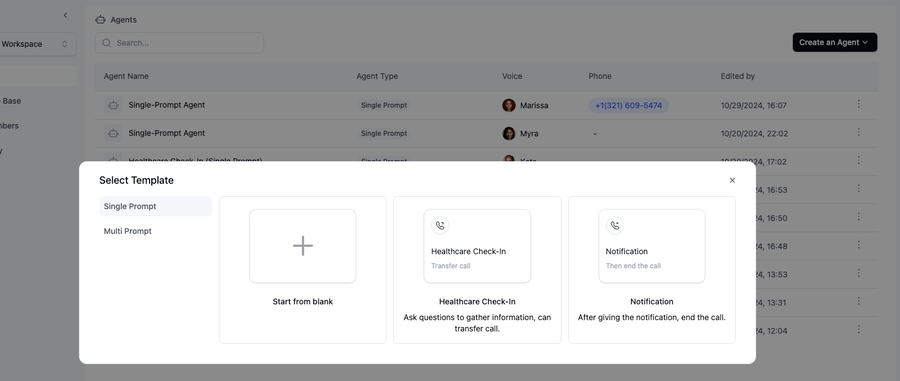
Navigate to the “Agents” tab
Click “Create an agent”
Choose a template
If you are not sure which template to choose, we recommend starting with “Lead qualification” in “Multi Prompt” category.
3
Test Your Agent
Click the “Test” button to test your agent
4
Add your payment method
Before buying a phone number, you need to add a payment method to your account
Go to the “Billing” tab and click “Change payment methods”
5
Deploy to a Phone Number
Go to the “Phone Numbers” tab
Click “Buy New Number”
(Optional) Enter the area code you want to buy the number for
Purchase your number
6
Test Your Phone Agent
Incoming Calls:
Dial your purchased number
Outbound Calls:
Click “Make an outbound call”
🎉 Congratulations! Your agent is now live and can:
Receive incoming calls
Make outbound calls
Handle natural conversations
Process requests 24/7
Enter the phone number including the country code (e.g., +12137774445)