> For the complete documentation index, see [llms.txt](https://project-44.gitbook.io/retell-ai/llms.txt). Markdown versions of documentation pages are available by appending `.md` to page URLs; this page is available as [Markdown](https://project-44.gitbook.io/retell-ai/deploy/make-and-receive-phone-calls.md).
# Make & receive phone calls
A step by step guide to make & receive phone calls with Retell managed numbers & imported numbers
From previous guides, you already have numbers purchased or imported. This guide will walk through how to assign agents, and make and receive phone calls.
#### [](https://docs.retellai.com/deploy/phone-call#bind-voice-agents)Bind Voice Agents
* Only when you bind agents to a number will the number be able to receive and make calls.
* You can assign different inbound and outbound agent to the number.
* You can leave agent unset to disable inbound / outbound (for example, you are doing outbound and don’t want callbacks, you can leave `inbound_agent_id` unset)
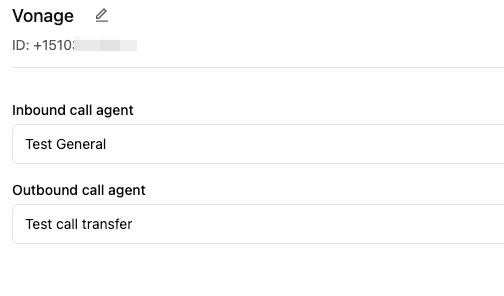
After binding an agent for inbound, you should be able to receive inbound calls already.
#### [](https://docs.retellai.com/deploy/phone-call#make-outbound-call)Make Outbound Call
If you are using a number purchased from Retell, right now it’s not able to make international calls. This restriction does not apply to imported numbers, as you have to set geo location permissions yourself at your telephony provider.
Check out [Create Phone Call API Reference](https://docs.retellai.com/api-references/create-phone-call) for all the parameters you can use.
* `from_number` is the e.164 string format of the number you purchased earlier.
* `to_number` is the phone number you want to call in e.164 string format.
NodePython
```typescript
const registerCallResponse = await retell.call.createPhoneCall({
from_number: '+14157774444', // replace with the number you purchased
to_number: '+12137774445', // replace with the number you want to call
});
console.log(registerCallResponse);
```
#### [](https://docs.retellai.com/deploy/phone-call#update-the-voice-agent-bound-to-a-number)Update the Voice Agent Bound to A Number
Check out [Update Phone Number API Reference](https://docs.retellai.com/api-references/update-phone-number) for all the parameters you can use to update the inbound and outbound agent who handles the phone. You can also turn off the inbound calls for the number by setting `inbound_agent_id` to `null`.
#### [](https://docs.retellai.com/deploy/phone-call#get-call-detail)Get Call Detail
* API: You can use [Get Call API](https://docs.retellai.com/api-references/get-call) to get information like transcript, recording, latency tracking, etc.
* Webhook: You can also setup webhooks to receive real time updates when call is initiated, ends, and analyzed. Read more at [Call Webhook Guide](https://docs.retellai.com/features/webhook#supported-event-types).
---
# Agent Instructions
This documentation is published with GitBook. GitBook is the documentation platform designed so that both humans and AI agents can read, navigate, and reason over technical content effectively. Learn more at gitbook.com.
## Querying This Documentation
If you need additional information that is not directly available in this page, you can query the documentation dynamically by asking a question.
Perform an HTTP GET request on the current page URL with the `ask` query parameter, and the optional `goal` query parameter:
```
GET https://project-44.gitbook.io/retell-ai/deploy/make-and-receive-phone-calls.md?ask=&goal=
```
`ask` is the immediate question: it should be specific, self-contained, and written in natural language.
`goal` is optional and describes the broader end goal you are ultimately trying to accomplish on behalf of the user. GitBook uses it to tailor the answer towards what is most useful for that goal.
The response will contain a direct answer to the question and relevant excerpts and sources from the documentation.
Use this mechanism when the answer is not explicitly present in the current page, you need clarification or additional context, or you want to retrieve related documentation sections.